
What is Kaltura MyMedia?
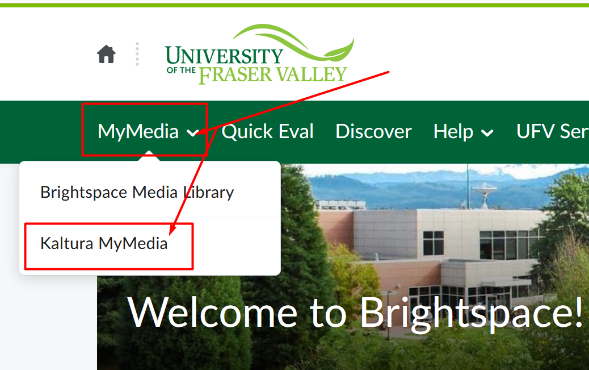
Kaltura MyMedia is a media repository within Brightspace. It can be found on the top navigation bar under MyMedia. The tool allows you to upload audio and video into your courses. This media tool provides faculty and students the opportunity to seamlessly author, upload, record, search and stream media contents.
Copyright for Video and Audio, MyClass, UFV Students
Both faculty and students need to refer to the video and audio copyright information. Uploading and posting content from copyrighted works requires authorization under the Copyright Act (Fair Dealing or other applicable exceptions) or by authorization from the copyright holder (licenses or direct permission). Faculty need to refer to the UFV Online copyright guidelines and the Copyright Guide to ensure that their use of materials within MyClass adhere to the authorization of the Copyright Act and to the terms of UFV licenses and contracts. Students should refer to the copyright information for Students in the Copyright Guide.
Help guides below,
 Kaltura MyMedia
Kaltura MyMedia - Where & How (PDF)
Kaltura MyMedia - How to Add Express Capture Videos (PDF)
Kaltura MyMedia - How to Upload & Publish Videos (PDF)
Kaltura MyMedia - How to Un-Publish Videos (PDF)
Kaltura MyMedia - How to Download My Media (PDF)
Kaltura MyMedia - How to Add Collaborators (PDF)
Kaltura MyMedia - How to Change Media Owner (PDF)
Kaltura MyMedia - How to Edit Kaltura Media (web page)
Assignments - How to Include Kaltura MyMedia (PDF)
Discussion Board - How to Include Kaltura MyMedia (PDF)
Page - How to Include Kaltura MyMedia (Faculty Only) (PDF)
Kaltura Capture
Kaltura Capture 00 Preparation & Troubleshooting (PDF)
Kaltura Capture 01 Before You Record (PDF)
Kaltura Capture 02 Set Up Recording Sources (PDF)
Kaltura Capture 03 How to Record (PDF)
Kaltura Capture 04 How to Preview Save & Upload (PDF)
Kaltura Capture 05 How to Refresh My Media (PDF)
Kaltura Capture 06 How to Play Media (PDF)
Kaltura Capture 07 How to Search inside Media (PDF)
Kaltura Capture Walkthrough Video (video)
Kaltura Capture: other videos (web page)
Kaltura Media Gallery
How to Add Media in Kaltura Media Gallery (PDF)
How to Create Playlists (Instructors only) in Kaltura Media Gallery (PDF)
Resources
HandBrake app for compressing video files (web page)
Kaltura Learning (web page)
Kaltura Video Tips: Recording Audio (web page)
Please contact TLC for more information.